
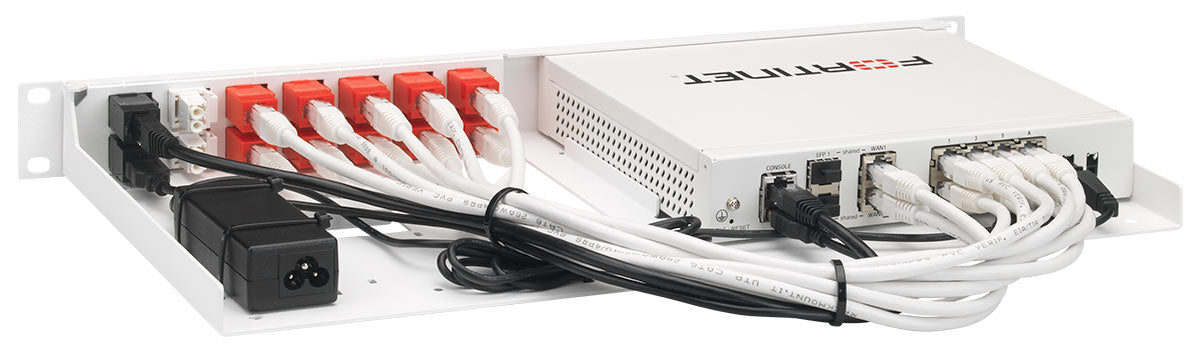
Every network closet has one: a firewall sitting on top of the switch, or balanced on a shelf, with its power brick dangling behind the rack. It works, until someone reaches in to trace a cable and the whole site drops. A rack mount kit costs $90 to $210 for most models and removes that failure mode permanently.
Why the shelf is a problem
- The power brick. Barrel connectors pull out with almost no force. It's the most common accidental outage in a small closet, and the hardest to diagnose remotely, because everything looks fine except the device that's off.
- Ports face the wrong way. A desktop appliance on a shelf usually has its ports facing the back of the rack, so every patch change means reaching around it.
- Heat. Stacked gear blocks its own vents. Firewalls that run hot throttle, and their power supplies age faster.
- Weight and movement. Anything loose in a rack eventually gets knocked, especially in closets shared with other trades.
- It looks unfinished. On a job you're being paid for, the rack is the deliverable the customer sees.
What a rack mount kit actually is
A steel enclosure sized to one rack space, cut for a specific appliance. The firewall drops in, the front panel brings its ports out to the front of the rack, and a bracket holds the power supply inside the enclosure. Vent cutouts follow the appliance's own airflow path, and the unused width is closed off so the rack doesn't lose airflow through an open gap.
Nothing is drilled or modified on the appliance, so mounting it doesn't affect the manufacturer's warranty.
Choosing the right kit
Match the exact model, not the family. A FortiGate 60F and an 80F need different kits (the RM-FR-T10 and the RM-FR-T15). The PoE versions differ again, because the power supply is larger: the 80F-POE takes the RM-FR-T18. Read the label on the bottom of the appliance rather than trusting the box or the purchase order; refurbished units in particular often arrive in the wrong packaging.
Then check these four things:
- One appliance or two? DUO kits hold a pair side by side in one rack space, which is the tidy way to rack an HA pair. The RM-FR-T20, for example, takes two FortiGate 90G or 91G.
- Standard or shielded? A shielded kit connects the appliance to the front ports with shielded cables and couplers, which protect the signal from electrical interference. Worth specifying on industrial sites and in electrically noisy rooms. The RM-FR-T15I is the shielded kit for the FortiGate 80F and 81F.
- Rack or DIN rail? Industrial sites and control cabinets use DIN rail; there are mounts for that instead, like the RM-FR-W1 for the FortiGate Rugged 60F.
- Wireless models. Check that the kit keeps the antennas usable. Racking a wireless firewall inside a metal cabinet will cost you coverage no matter what the kit does.
Our kit finder lists every appliance model we carry a kit for, straight to the part that fits it.
Installing it
Ten minutes of work, in this order:
- Power down and unplug the appliance. Note which cable went in which port, because they will not be in the same places afterward.
- Seat the appliance in the enclosure and fit the retaining screws. Don't force it; if it doesn't sit flat, you have the wrong kit.
- Secure the power supply in its bracket, and coil the excess lead inside the enclosure rather than out the back.
- Mount at a sensible height. Firewalls and routers belong near the patch panel and the switch they connect to, so patch leads stay short.
- Use cage nuts properly. Start every screw by hand; cross-threading a square-hole rail is a bad afternoon.
- Dress the cables with a service loop at the front. Leave enough slack to slide the unit forward without unplugging anything.
- Plug into the PDU, not the wall. If the rack has a switched PDU, this is the moment to name that outlet so a remote reboot later is one click, not guesswork.
- Label the front. Model, IP address, and who to call.
Heat, and what not to do
Desktop appliances cool themselves by convection through side or bottom vents. A proper kit keeps those paths open, but two habits undo it: stacking something directly on top of the enclosure, and mounting the unit hard against a blanking panel that blocks the vents. In a sealed wall cabinet, a rack fan or a vented door does more for the firewall's life than anything else in this list.
When not to rack it
Shallow wall-mount cabinets often can't take the depth of an enclosure plus cable bend radius. Measure before ordering. And if an appliance genuinely has to be moved between sites, a kit just adds screws to undo.
A closet with no rack at all is a different job. A UniFi Cloud Gateway, for one, can go flat on the wall in a HangLab wall mount for the UCG-Max or the UCG-Fiber.
Getting it right the first time
Many of these kits can't be returned, so email support@rackit.com with the model number off the label and we'll confirm the fit before anything ships. Browse the rack mount kits, or start with the kit finder if you already know your appliance.